CLI reference
Installed as dddlint. Every command auto-detects each file's language and
downloads the tree-sitter grammar on first use, so there is nothing to configure.
Global options
| Option | Description |
|---|---|
-v, --version |
Print the version and exit |
-h, --help |
Show help and exit |
lint
Lint a codebase for ubiquitous-language violations.
| Argument / option | Default | Description |
|---|---|---|
ROOT |
current directory | Directory to scan recursively |
--config PATH |
ROOT/dddlint.yaml |
Config file to load |
Config resolution: if --config is omitted, dddlint looks for dddlint.yaml
in ROOT, then falls back to the current working directory.
Directories skipped while scanning: .git, .venv, node_modules,
__pycache__, target, dist, build. On top of those, dddlint honours the
config's exclude patterns and any .gitignore
beside the config file. Both are matched relative to the config file's
directory, so dddlint lint src/billing still respects patterns written
relative to the project root.
Directory and module names are linted alongside the definitions, as
forbidden:module and alias:module.
The config file itself is validated on every run (see the config rules).
Exit code
| Code | Meaning |
|---|---|
0 |
No findings |
1 |
One or more findings (printed to stdout) |
2 |
No config found at the resolved path |
init
Write a starter dddlint.yaml.
| Argument | Default | Description |
|---|---|---|
ROOT |
current directory | Directory to write dddlint.yaml into |
The file lists the defaults with every list left empty, so it produces no
findings until you fill it in. Refuses to overwrite an existing config, exiting
1 and leaving your file alone.
map
Report project-level vocabulary insights from name embeddings.
| Argument / option | Default | Description |
|---|---|---|
ROOT |
current directory | Directory to scan recursively |
--config PATH |
ROOT/dddlint.yaml |
Config file to load |
map is the one command that needs an embedding backend, installed as an extra:
dddlint[embed-local] for a model that runs offline, or dddlint[embed] for a
hosted one such as openai:text-embedding-3-small. Without either, map exits
2 naming the extra to install; lint, html, and lsp never embed anything.
Where lint compares names token by token, map embeds every definition name
and compares meaning, which catches the pairs that share an idea but no
spelling. Takes the same ROOT and --config arguments as lint and emits the
insights, ordered by score:
4 names
──────────────────────────────────────────────────────────────────
  1.00  near-synonym      fetch_order, retrieve_purchase  same idea, unrelated words: fetch_order, retrieve_purchase; pick one canonical term
  0.50  context-outlier   fetch_order  reads like core vocabulary but lives in billing

◆ 2 insights
The first run downloads the model from
embeddings.model and writes vectors to
embeddings.cache; later runs only embed names that are new. Exits 0 whatever
it finds, so it informs rather than gates. Prints no definitions found on an empty tree.
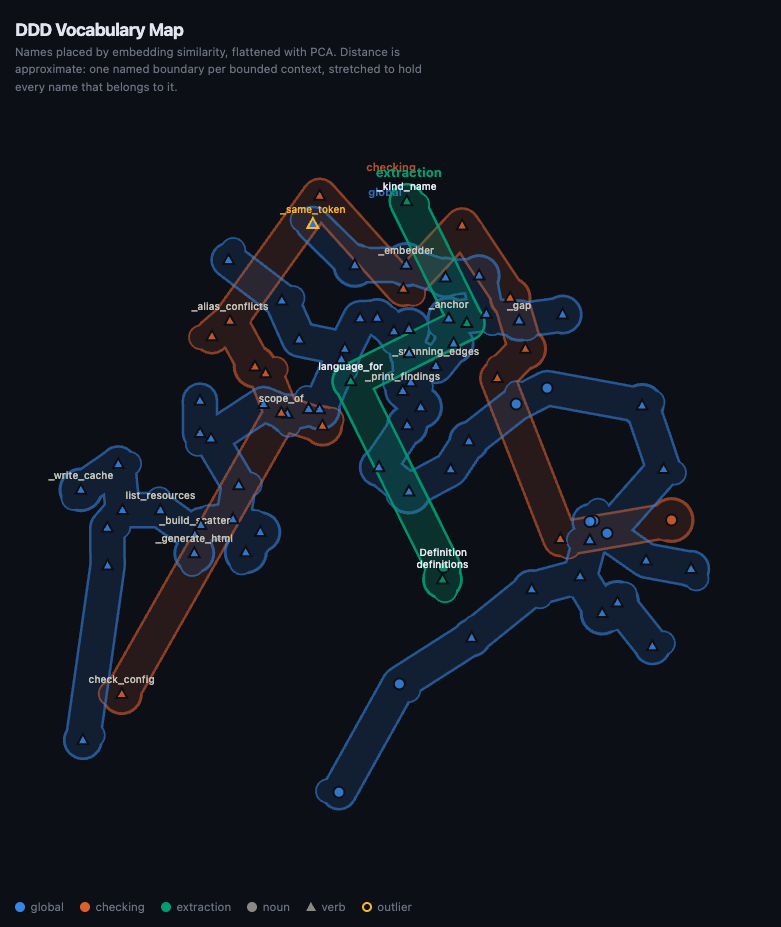
Every run also writes a scatter plot of the vocabulary to dddmap.html beside
the config and opens it: names laid out by PCA so neighbours mean similar things, drawn as
triangles for verbs and dots for nouns. One named boundary wraps each bounded
context, stretched around every name that belongs to it, so a context is one
region however far PCA scatters its names. Names in files no domains or
contexts glob claims are unassigned: grey, dashed, and inside no boundary,
because they belong to no bounded context yet. Hovering a boundary brightens it and
labels every name inside; otherwise one name per cluster is labelled, outliers
always are, and zooming past 1.4 labels everything. Pan and zoom in the
browser.
html
Open an interactive language graph in the browser.
Renders the configured vocabulary (canonical terms, aliases, domains, and
contexts) to a temporary HTML file and opens it in your default browser. Takes
the same ROOT and --config arguments as lint.
lsp
Start the Language Server over stdio.
Publishes diagnostics on file open and save, scanning the whole workspace each
time, and offers rename code actions for aliases. Wire it into an editor with
the editor guide. Also available as the
dddlint-lsp entry point.